

So guys let's have a look how to configure Vodafone K3570-Z USB Modem.


Now select Vodafone Mobile Broadband Modem (ZTE) and right click on it and select property.

As shown above picture a window will open, select advance tab on it and type command as shown above and click OK.

Now click on Vodafone dialer and run it and go to settings.
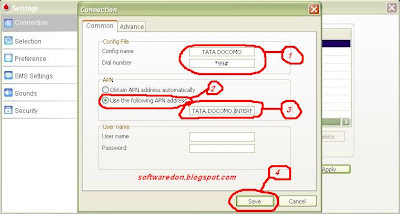

Select connection click on add then
window will open as shown above image and type the all things as show
above image and click save.


Now click on preference and select UMTS/HSPA only and click on Apply.


